OpenClaw is powerful on its own. It can manage files, browse the web, run shell commands, and orchestrate complex workflows. But the real magic happens when you connect it to the tools you already use every day — your project management system, your GitHub repositories, your CRM, your databases, your messaging platforms.
Until recently, each of these integrations required a custom-built skill with its own authentication logic, API client, and data transformation layer. If someone had not already written and published a skill for your tool on ClawHub, you were out of luck — or facing hours of development work.
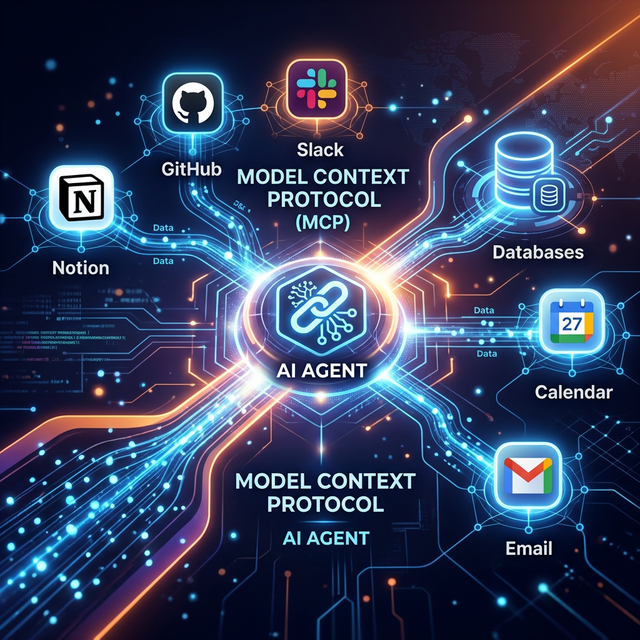
The Model Context Protocol (MCP) changes this entirely. MCP is an open standard, originally introduced by Anthropic in late 2024 and now adopted by OpenAI, Google DeepMind, and the broader AI ecosystem. It provides a universal interface that any AI agent can use to communicate with any external tool — as long as that tool has an MCP server.
And hundreds of tools already do.
This guide explains what MCP is, how it works with OpenClaw, and walks you through connecting your agent to some of the most popular integrations.
What Is MCP?
Think of MCP as USB for AI agents. Before USB, every peripheral device needed its own proprietary cable and driver. USB created a universal standard — plug anything in, and it just works.
MCP does the same thing for AI-to-tool communication. Instead of building custom integrations for every service, you connect OpenClaw to an MCP server, and the server exposes a structured set of tools, resources, and prompts that the agent can use.
The Three Primitives
MCP defines three types of capabilities that a server can expose:
Tools are actions the agent can execute. For example, a GitHub MCP server might expose tools like create_issue, list_pull_requests, merge_branch, and search_code. The agent sees the tool schemas, understands what parameters they accept, and can invoke them as needed.
Resources are data the agent can read. A Notion MCP server might expose your pages, databases, and document contents as resources. The agent can browse and search this data to answer questions or populate workflows.
Prompts are pre-defined interaction patterns. A customer support MCP server might expose a prompt template for handling refund requests, with structured inputs for order number, customer name, and reason.
How OpenClaw Connects to MCP
OpenClaw uses a component called MCPorter — a TypeScript runtime and CLI toolkit that acts as the bridge between OpenClaw's agent context and MCP servers. MCPorter handles:
- Translating MCP tool schemas into the format OpenClaw's LLM understands
- Routing tool calls from the agent to the correct MCP server
- Managing authentication and connection lifecycle
- Ensuring type-safe responses
You do not need to interact with MCPorter directly. It runs as part of OpenClaw's skill infrastructure.
Step 1: Install the MCP Bridge Skill
# Install the MCP integration skill
openclaw skills install mcp-bridge

# Verify installation
openclaw skills list | grep mcp
✓ mcp-bridge@2.0.1 — Model Context Protocol integration for OpenClaw
Step 2: Configure Your First MCP Server
MCP servers can run locally (as a subprocess on your machine) or remotely (as a hosted service). Let's start with a practical example: connecting OpenClaw to your file system through the official filesystem MCP server.
# In ~/.openclaw/config.yaml
mcp:
  servers:
    filesystem:
      command: "npx"
      args: ["-y", "@modelcontextprotocol/server-filesystem", "/Users/you/Documents"]
      description: "Access to Documents folder"
This tells OpenClaw to spin up a local MCP server that provides structured access to your Documents folder. The agent can now list files, read contents, search by name, and more — all through standardized MCP tool calls.
Step 3: Connect to Popular Services
Here is where it gets exciting. The MCP ecosystem has exploded in 2026, with hundreds of servers available for major services. Here are the most useful integrations for OpenClaw users:
GitHub
mcp:
  servers:
    github:
      command: "npx"
      args: ["-y", "@modelcontextprotocol/server-github"]
      env:
        GITHUB_PERSONAL_ACCESS_TOKEN: "${GITHUB_TOKEN}"
      description: "GitHub repository management"
What your agent can do: Create and manage issues, review pull requests, search code across repositories, create branches, manage releases, and read CI/CD status.
Example command: "Hey OpenClaw, check if there are any open issues in the frontend repo labeled as bugs, and create a summary report."
Notion
mcp:
  servers:
    notion:
      command: "npx"
      args: ["-y", "@notionhq/mcp-server"]
      env:
        NOTION_API_KEY: "${NOTION_KEY}"
      description: "Notion workspace access"
What your agent can do: Read and write Notion pages, query databases, create new entries, update properties, and search across your workspace.
Example command: "Add a new row to my Content Calendar database in Notion with title 'MCP Integration Guide', status 'In Progress', and due date next Friday."
Slack
mcp:
  servers:
    slack:
      command: "npx"
      args: ["-y", "@anthropic/mcp-server-slack"]
      env:
        SLACK_BOT_TOKEN: "${SLACK_TOKEN}"
      description: "Slack workspace communication"
What your agent can do: Send messages to channels, read conversation history, search messages, manage channels, and respond to threads.
Example command: "Post a summary of today's completed tasks to the #standup channel in Slack."
PostgreSQL Database
mcp:
  servers:
    database:
      command: "npx"
      args: ["-y", "@modelcontextprotocol/server-postgres"]
      env:
        DATABASE_URL: "${DB_URL}"
      description: "Production database (read-only)"
What your agent can do: Run SQL queries (read-only by default), inspect table schemas, analyze data, and generate reports.
Example command: "How many new users signed up in the last 7 days? Break it down by country."
Google Drive
mcp:
  servers:
    gdrive:
      command: "npx"
      args: ["-y", "@anthropic/mcp-server-gdrive"]
      env:
        GOOGLE_CREDENTIALS: "${GOOGLE_CREDS_PATH}"
      description: "Google Drive file access"
What your agent can do: List files, read documents and spreadsheets, search by name or content, and organize files into folders.
Step 4: Multiple Servers Working Together
The real power of MCP emerges when you connect multiple servers simultaneously. Your agent can now orchestrate workflows that span different services:
You: "Check our GitHub for any critical bugs filed this week.
     For each one, create a task in our Notion sprint board,
     post a summary to #engineering in Slack, and query the
     database to see how many users are affected."
OpenClaw processes this request by:
- Calling the GitHub MCP server to search for recent critical issues
- Calling the Notion MCP server to create entries in the sprint database
- Calling the Slack MCP server to post the summary
- Calling the PostgreSQL MCP server to run a user impact query
- Assembling all results into a coherent response
Each MCP server handles its own authentication and API interaction. OpenClaw just orchestrates the calls.
Security Considerations
Connecting your AI agent to production services requires careful thought about access and boundaries:
Principle of least privilege. Only give each MCP server the minimum permissions it needs. If the agent only needs to read from your database, configure the connection as read-only. If it only needs to access one Notion database, scope the API key accordingly.
Audit logging. Enable verbose logging for MCP calls so you can review what tool calls the agent made:
mcp:
  logging:
    level: "verbose"
    log_file: "~/.openclaw/logs/mcp.log"
    include_tool_args: true
Sensitive data boundaries. If your MCP server exposes access to sensitive data (customer PII, financial records, credentials), configure explicit boundaries:
mcp:
  servers:
    database:
      boundaries:
        forbidden_tables: ["users_credentials", "payment_tokens"]
        max_rows: 100          # Prevent data dumps
        query_timeout: 10      # Seconds
Network isolation. MCP servers that run locally as subprocesses are naturally isolated — they only communicate through stdin/stdout with MCPorter. Remote MCP servers communicate over HTTPS with standard TLS encryption.
Building Your Own MCP Server
If you use a tool that does not have an existing MCP server, you can build one. The MCP specification is open and well-documented, and the TypeScript SDK makes it straightforward:
# Install the MCP SDK
npm install @modelcontextprotocol/sdk
A minimal MCP server exposes at least one tool:
import { McpServer } from "@modelcontextprotocol/sdk/server/mcp.js";
import { StdioServerTransport } from "@modelcontextprotocol/sdk/server/stdio.js";

const server = new McpServer({
  name: "my-custom-server",
  version: "1.0.0"
});

server.tool("get_weather",
  { city: { type: "string", description: "City name" } },
  async ({ city }) => {
    const weather = await fetchWeather(city);
    return { content: [{ type: "text", text: JSON.stringify(weather) }] };
  }
);

const transport = new StdioServerTransport();
await server.connect(transport);
Register it in your OpenClaw config, and your agent immediately has access to the new tool.
The MCP Ecosystem in 2026
The MCP ecosystem has grown rapidly since Anthropic published the specification. As of February 2026:
- 500+ community-built MCP servers are available on npm and GitHub
- Major platforms including GitHub, Notion, Slack, Linear, Jira, Confluence, Stripe, and Shopify have official or community-maintained MCP servers
- Database support covers PostgreSQL, MySQL, SQLite, MongoDB, and Redis
- All major AI providers — Anthropic, OpenAI, and Google — have adopted MCP as their standard for tool integration
- OpenClaw's MCPorter supports connecting to an unlimited number of MCP servers simultaneously
The protocol is still evolving, with active development on features like streaming tool results, bidirectional communication (servers calling back to the agent), and server discovery (automatically finding available MCP servers in your environment).
Conclusion
MCP eliminates the integration tax. Before MCP, connecting OpenClaw to a new service meant finding or building a custom skill, dealing with authentication quirks, and writing data transformation logic. Now, it means adding five lines of YAML to your config file.
The universal protocol pattern has worked before — USB, TCP/IP, HTTP — and it is working again. MCP is becoming the standard way that AI agents talk to the digital world.
Connect your tools. Let the agent orchestrate. Focus on the work that matters.