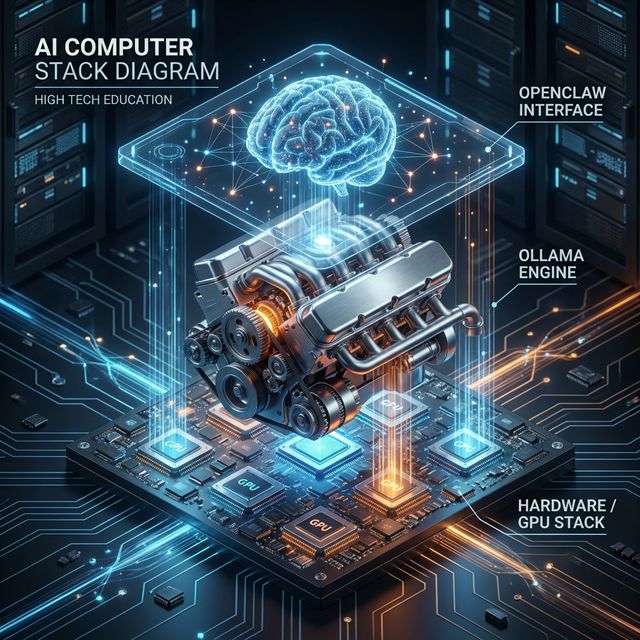
If you are new to the world of local Artificial Intelligence, the terminology can be overwhelming. You hear about LLMs, Inference Engines, Agents, Vectors, and Containers, often used interchangeably or in confusing contexts.
A common question we see in the community is: "Is OpenClaw the model? Do I need Ollama if I have OpenClaw? Where does Docker fit in?"
To build a robust, private, and powerful AI system, you need to understand the Local AI Stack. Just like web developers have the "MERN" stack (MongoDB, Express, React, Node), local AI has its own layers.
In this deep dive, we will visualize and explain this stack from the bottom up—starting with the silicon on your desk and ending with the autonomous agent executing tasks on your behalf.
The 4 Layers of the Local AI Stack
To understand how OpenClaw works, you need to distinguish between the Brain (the Agent), the Engine (the Runner), and the Body (the Hardware).
Here is the hierarchy:
- Layer 1: The Hardware (GPU/NPU/RAM) - The physical capability.
- Layer 2: The Runner (Ollama/Llama.cpp) - The software that runs the model.
- Layer 3: The Intelligence (The LLM) - The "weights" or knowledge.
- Layer 4: The Agent (OpenClaw) - The application that "does" things.
Let's explore each layer in detail.
Layer 1: The Hardware (The Foundation)
Everything starts here. Unlike cloud AI (like ChatGPT), where the computation happens on NVIDIA H100s in a data center in Virginia, local AI runs on the metal sitting in front of you.
VRAM is King
The most critical constraint in local AI is VRAM (Video RAM). Large Language Models (LLMs) are massive files containing billions of parameters. To run fast, these parameters must be loaded into your GPU's high-speed memory.
- 8GB VRAM: Enough for small "quantized" models (7B or 8B parameters). Good for basic chat.
- 16GB - 24GB VRAM: The sweet spot. Can run powerful models like Llama-3-70B (heavily quantized) or high-precision coding models.
- Unified Memory (Apple Silicon): This is why Mac Studios are popular. The CPU and GPU share the same memory pool. A Mac with 128GB of RAM effectively has 128GB of VRAM, allowing it to run massive models that would otherwise require $30,000 worth of PC hardware.
The Rise of the NPU
Newer chips from Intel (Core Ultra), AMD (Ryzen AI), and Apple (M-Series) include NPUs (Neural Processing Units). These are specialized cores designed specifically for the matrix math that AI requires. While currently less supported than GPUs, they are the future of energy-efficient local AI.
Layer 2: The Runner (The Engine)
You have the hardware, but how do you actually "run" an AI model file? You can't just double-click a .gguf file. You need an Inference Engine.
What is Ollama?
Think of Ollama as the "Docker for Models." It is a backend service that manages the complex details of loading models into memory, optimizing them for your specific hardware, and exposing a simple API (usually comparable to OpenAI's API) for other apps to talk to.
Ollama (and alternatives like LM Studio or LocalAI) wraps lower-level libraries (like llama.cpp) into a user-friendly package.
The Runner's Job:
- Read the model file from your disk.
- Offload as many layers as possible to your GPU.
- Listen for text input ("The prompt").
- Predict the next token (word) based on probability.
- Send the text back.
Crucially: The Runner has no memory of past conversations (unless fed back to it), no concept of "files" on your computer, and no ability to browse the web. It is a pure text-in, text-out engine.
Layer 3: The Intelligence (The Model)
This is the actual "brain tissue." When people say "Llama 3," "Mistral," or "Gemma," they are talking about the Model Weights.
These are static files. They don't do anything until loaded by the Runner.
Quantization: Determining "Smartness" per GB
In local AI, we often trade precision for size. A "full precision" model (FP16) is huge. We use Quantization (reducing the number of bits per parameter) to shrink them.
- Q4_K_M: (4-bit quantization). The standard balance. Smart enough, but 4x smaller than the original.
- Q8: (8-bit). Near-perfect quality, but heavy.
OpenClaw doesn't care which model you use, as long as the Runner serves it up via a standard API. This means you can swap out the "brain" of your agent instantly. Today you might use DeepSeek-Coder for programming; tomorrow you might swap it for Llama-3-Instruct for creative writing.
Layer 4: The Agent (OpenClaw)
This is where the magic happens. This is the top of the stack.
OpenClaw is not a model. It is an Agentic Runtime Environment. It is the software that gives the AI "hands" and "eyes."
The "Loop"
OpenClaw operates in a continuous loop that looks like this:
- Observation: It looks at the user's request ("Find me a cheap flight to Tokyo").
- Reasoning: It sends the request + its available tools to the LLM (Layer 3) via the Runner (Layer 2).
- Prompt to LLM: "I have a tool called 'Browser'. The user wants flight info. What should I do?"
- Response from LLM: "Use the Browser tool to visit Expedia."
- Action: OpenClaw executes the code to open the browser.
- Feedback: The browser returns the HTML of the page.
- Loop: OpenClaw sends the new HTML back to the LLM. "Now what?"
Context Management
The Runner (Ollama) has a limit on how much text it can process at once (the "Context Window"). OpenClaw manages this seamlessly. It summarizes old conversations, stores important details in a rigid long-term memory (Markdown files), and injects only the relevant info into the current prompt.
This serves as the Operating System for the AI, managing resources, memory, and permissions.
The Sidecar: Docker (The Sandbox)
When you give an AI agent control of your mouse and keyboard, Safety becomes paramount. You don't want a hallucinating model to accidentally delete your Documents folder.
This is where Docker fits in.
Docker creates a Container—a lightweight, isolated virtual computer inside your real computer.
- Without Docker: OpenClaw runs directly on your host OS. If it runs
rm -rf /, it deletes your files. - With Docker: OpenClaw runs inside a container. It thinks it has full root access, but it can only see the files inside that container. If it destroys the system, you just restart the container, and your real computer is untouched.
For "risky" agents—ones that browse the live web or execute random python code—running the implementation layer inside a Docker container is the gold standard for security.
Putting It All Together: A Real-World Workflow
Let's see how the whole stack activates when you send a message.
User types: "Hey OpenClaw, analyze my budget.csv file and plot a graph."
- Application Layer (OpenClaw): Receives the message. It checks its Memory and sees where
budget.csvis located. - Orchestration: OpenClaw constructs a prompt: "You are a data analyst. The user provided this CSV data. Write Python code to plot it."
- API Call: OpenClaw sends this prompt to
http://localhost:11434(The default address for Ollama). - Runner Layer (Ollama): Receives the text. It wakes up the Model (e.g.,
llama3) loaded in Layer 3. - Hardware Layer (GPU): The GPU cores crunch the matrix multiplications. The fans spin up.
- Response: The LLM returns a block of Python code to OpenClaw.
- Execution (Docker): OpenClaw takes that Python code and runs it inside a safe Docker container. It doesn't run it on your main OS.
- Result: The Docker container returns an image file (
graph.png). - Delivery: OpenClaw displays the image in your chat window.
Why Understanding This Matters
Understanding the stack empowers you to troubleshoot and optimize.
- Is OpenClaw slow? It's likely your Hardware (Layer 1) or your Runner configuration (Layer 2), not OpenClaw itself.
- Is the AI giving bad answers? That's the Model (Layer 3). Try swapping Llama 3 for Mistral.
- Did the AI fail to save the file? That's likely a permission issue in the Agent (Layer 4) or Docker configuration.
The Local AI stack is modular. You can upgrade your GPU without changing your agent. You can switch from Ollama to LM Studio without losing your memories. You can swap OpenClaw for another agent framework (though we don't know why you'd want to!) without re-downloading your models.
This modularity is the superpower of the open ecosystem. By owning the stack, you own the intelligence.